
Electricity, Gas and Water Bill Payment API: How Integration Works
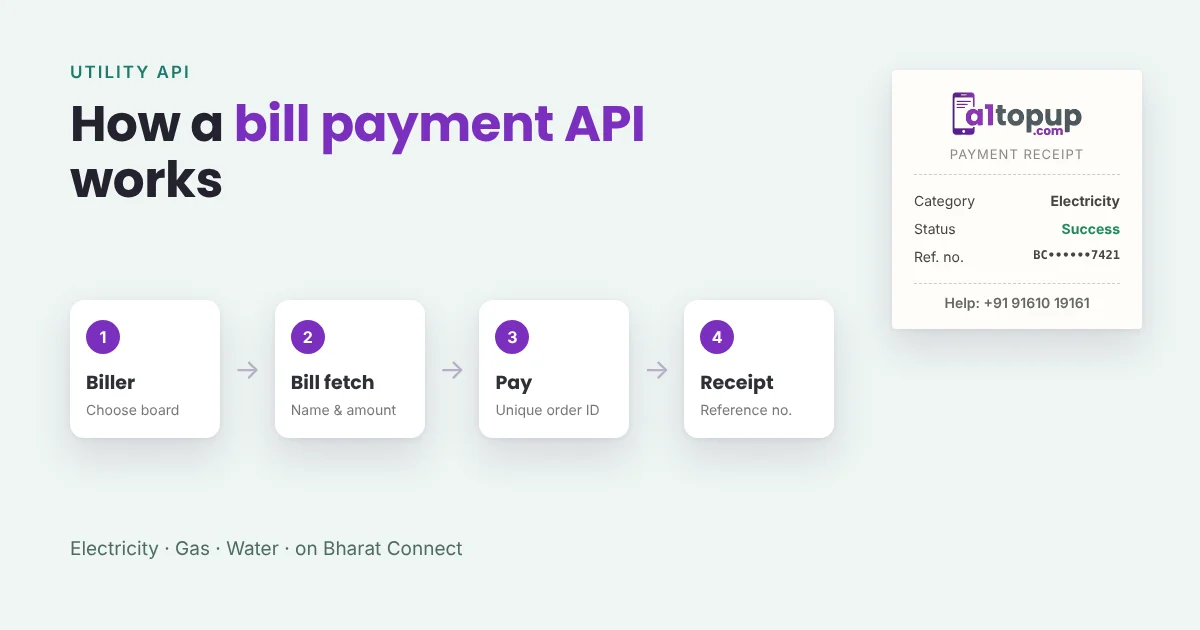
Adding electricity, gas and water bill payments to your portal brings customers back every month. In India these payments run on Bharat Connect, formerly known as BBPS, which links payment platforms to billers through one standard system. You do not connect to each electricity board separately; you connect to a bill payment API, and the API connects to Bharat Connect.
The flow in five steps
- Biller list. Your software gets the list of billers (for example, a state electricity board or a gas company) and the fields each one needs, like consumer number or account ID.
- Bill fetch. The retailer enters the customer's number, and the API returns the customer name, bill amount and due date from the biller.
- Confirm with the customer. The retailer reads out the name and amount. This one step prevents most wrong payments.
- Payment. Your software sends the payment request with the amount and a unique order ID, and the API returns success, pending or failure.
- Receipt and status. On success, you show and send the receipt with the Bharat Connect reference number. On pending, you check status later instead of guessing.
What your software needs
| Part | Why it matters |
|---|---|
| Dynamic form per biller | Billers ask for different fields; the form should change with the biller |
| Bill fetch before pay | Shows the real amount and name, and avoids paying the wrong account |
| Unique order ID for every request | Lets you check status and avoid paying twice |
| Status check and callback handling | Pending payments settle later; your wallet must follow the final status |
| Receipt with reference number | The customer's proof, and what they need for any complaint |
Common mistakes
- Refunding a pending payment too early. If it later succeeds, you have paid the bill and refunded the retailer. Always wait for the final status.
- Skipping bill fetch. Some billers allow payment without it, but wrong consumer numbers then become your problem.
- Retrying with the same order ID, or a new one too fast. Check the status of the first request before sending another.
- No receipt. Customers trust the counter more when they get a receipt on WhatsApp.
Pro tip: keep the bill fetch response with the transaction. If a customer later says "I paid the wrong amount", you can show exactly what the biller returned.
Which bill categories to start with
Electricity is usually the busiest, followed by gas cylinder booking, piped gas, water, broadband and postpaid mobile. FASTag works in a similar way; our FASTag recharge API guide covers it.
Add bill payments to your portal
A1Topup's Utility API includes biller lists, bill fetch and status checks, and works with our recharge software or your own. Ask for the API document on WhatsApp.
Frequently asked questions
Do I need to connect to each electricity board separately?
What is bill fetch?
What should I do if a bill payment is pending?
Have a question? Talk to our team
Related articles
LPG Cylinder Booking and Gas Bill Payment API: A Simple Guide
Gas is a monthly need in every home. Here is how LPG booking and gas bill payments work through an API.
Read more →
New Bill Categories to Add in 2026: EV Wallets, NCMC Cards and eChallan
Mobile and electricity are just the start. Newer bill categories can bring different customers to your counter.
Read more →
BBPS Is Now Bharat Connect: What It Means for Bill Payment APIs in 2026
The bill payment network you know as BBPS now goes by Bharat Connect. Here is what that means for businesses using a bill payment API.
Read more →